> For the complete documentation index, see [llms.txt](https://docs.axiom.trade/llms.txt). Markdown versions of documentation pages are available by appending `.md` to page URLs; this page is available as [Markdown](https://docs.axiom.trade/support.md).
# Support
This page provides clear instructions to join the Discord server and create a support ticket safely. Follow each step carefully to avoid scams and ensure a smooth setup process.
Join our Discord: [**Join Here**](https://discord.gg/axiomtrade)
{% hint style="danger" %}
**In trading servers, scammers often impersonate support staff or offer unsolicited help to gain your trust. Always disregard direct messages from individuals claiming to be support. Seek assistance only through private tickets.**
{% endhint %}
***
{% stepper %}
{% step %}
### Join Our Discord
To join our Discord server, click the link found above. If you do not have a Discord account yet, create one by following the sign-up prompts, then return to the link to join the server.
{% endstep %}
{% step %}
### Verify Your Account
We require everyone to click the verification emoji to prove they aren’t a bot before accessing the server. This simple step helps us keep the community safe by limiting automated bot accounts from joining and spamming channels. It ensures that only real users gain access, creating a secure and organized environment for everyone.
{% endstep %}
{% step %}
### Ignore Any Direct Messages
Once you’ve joined, make sure to ignore any direct messages from people claiming to be support or offering help, as official assistance will only be provided through server channels.\
\
Turn off DMs from Server Members (Optional but recommended):
1. Right click the Axiom server icon!
2. Scroll down until you find "Privacy Settings"\

3. Turn "Direct Messages" option off\

{% endstep %}
{% step %}
### Make a Ticket
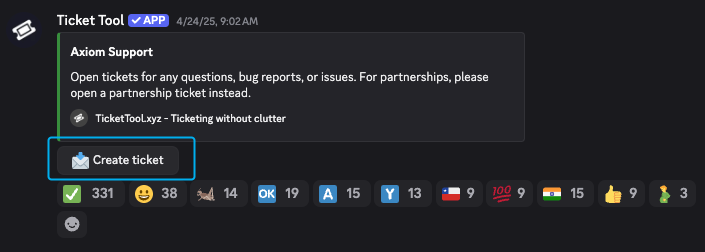
Once you’ve joined the server, scroll up to the top of the channel list and look for the channel named “tickets.” Click on it and follow the instructions to create a support ticket so our team can assist you.
{% endstep %}
{% step %}
### Going To Your Private Ticket
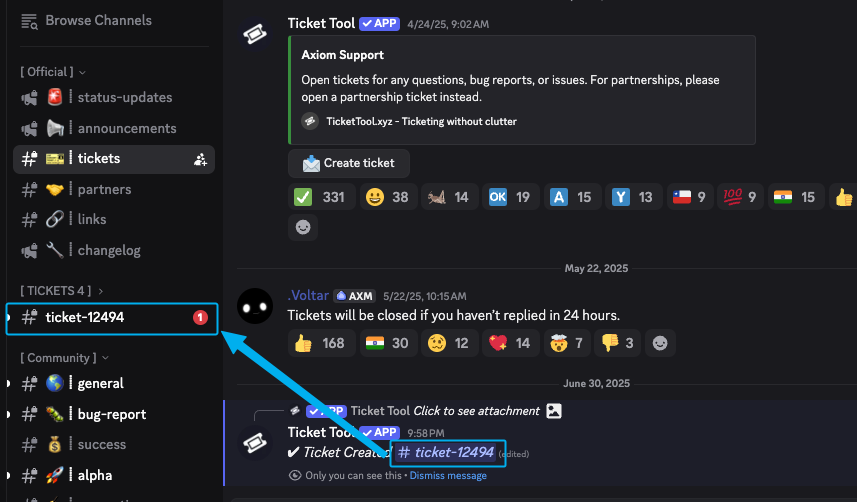
After you create your ticket, make sure to click on the new ticket channel that appears on the left sidebar. This will open your ticket so you can provide details and communicate directly with the support team.
{% endstep %}
{% step %}
### Providing Information & Waiting
After creating your ticket, make sure to provide detailed and accurate information about your issue. The more in-depth your explanation, the faster our staff can help resolve your question. Remember, our staff are working very hard to assist everyone, so please be respectful and patient while waiting for a response.
{% endstep %}
{% endstepper %}